Measurement Timing
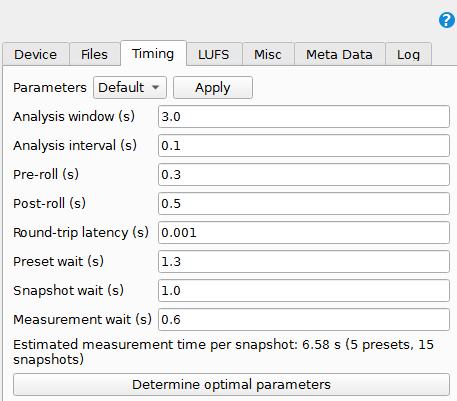
Timing gives the processor and the audio system time to settle before MatchPatch records and measures a snapshot.
This matters because preset changes, snapshot changes, audio latency, delay tails, and reverb trails can all affect the next measurement.
Timing Fields
Pre-Roll
Silence recorded before the reference DI starts. This gives the recording a little space before the performance.
Post-Roll
Silence recorded after the reference DI ends. This gives the recording room for latency and short tails.
Round-Trip Latency
The time it takes for audio to leave the computer, pass through the processor, and return to the computer.
Preset Wait
How long MatchPatch waits after switching to a preset.
Snapshot Wait
How long MatchPatch waits after switching to a snapshot.
Measurement Wait
How long MatchPatch waits just before capturing the loudness measurement.
Analysis Window
How much audio MatchPatch uses for each loudness measurement.
Analysis Interval
How often MatchPatch checks loudness inside the recorded audio.
Default And Fast Presets
The Timing tab includes Default and Fast timing presets.
Use Default first. Fast can save time, but it can also be unstable when presets have delay, reverb, or other trails.
Warning: Fast timing can let one snapshot’s delay or reverb tail bleed into the next measurement.
Measurement Time Estimate
MatchPatch shows an estimated time per snapshot and total time for selected presets. Ignored snapshots are skipped in the estimate.
When To Optimize Timing
Use Determine optimal parameters when:
repeated measurements do not agree;
delay or reverb trails are long;
hardware switching seems slow;
you want the shortest timing that still measures reliably.
See also: Optimize Timing.
Next Step
Run a parameter study: Optimize Timing
Fix unstable measurements: Troubleshooting