Reading Results
After measurement, the preset table shows what MatchPatch found and what it wants to change.
Use this page before saving if you are unsure what a table cell means.
Successful Results
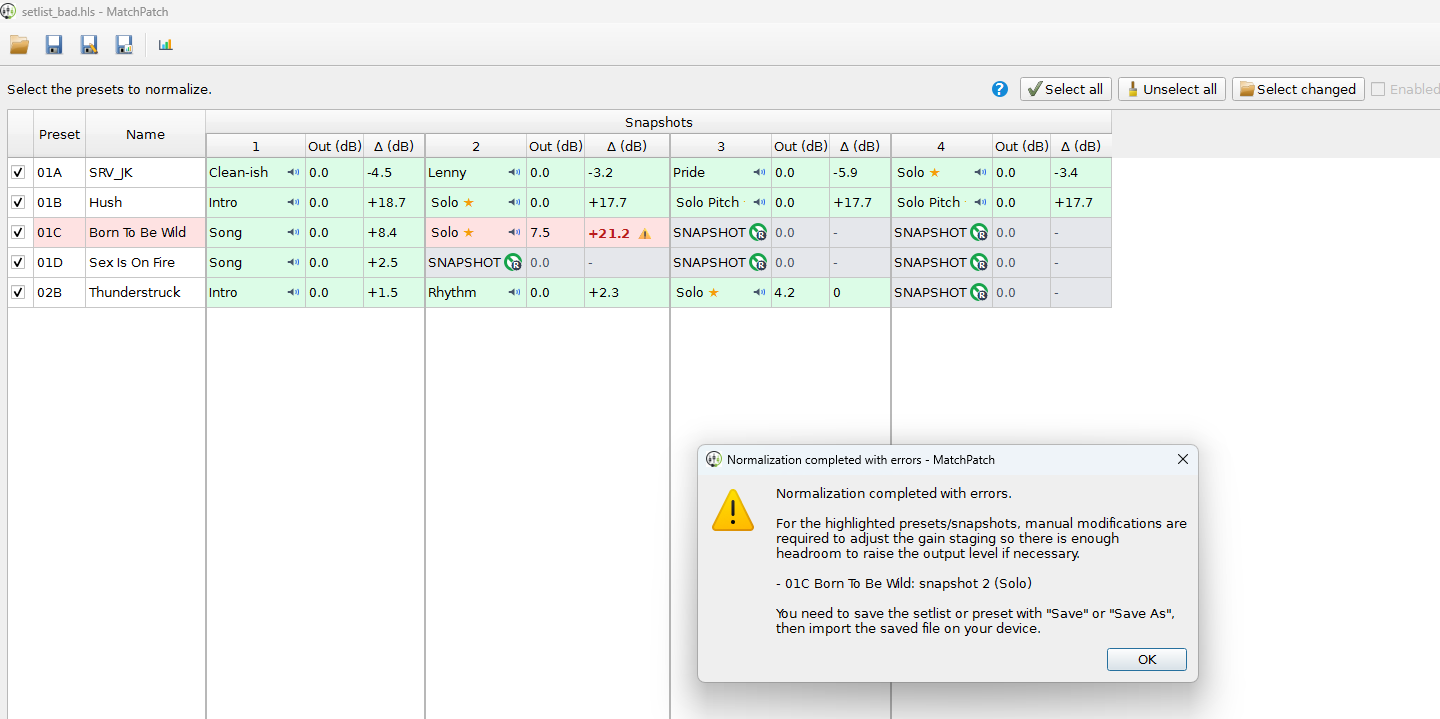
A normal successful snapshot shows:
its snapshot name;
its current output level in Out dB;
a calculated gain change in Delta dB.
Example:
Out dB: -4.0
Delta dB: +2.5
This means the snapshot currently sits at -4.0 dB, and MatchPatch wants to
raise it by 2.5 dB.
Pending Results
During measurement, selected snapshots may show ?.
That means the snapshot has not been measured yet.
Ignored Snapshots
Ignored snapshots show - in the adjustment column and are styled grey.
MatchPatch does not adjust them.
Solo Stars
A star marks snapshots MatchPatch recognizes as solos. These snapshots receive the configured solo boost.
Custom Adjustment Notes
If you use a custom adjustment file, the table may show a blue value in parentheses.
Example:
+1.0 (+1.5)
The first number is the normal visible adjustment. The value in parentheses is the custom bump.
Red Cells
Red highlighted cells mean MatchPatch could not safely calculate a normal adjustment.
Common reasons include:
silence was recorded;
routing was wrong;
the output level would go outside the processor range;
the measurement did not produce usable loudness data.
Warning: Investigate red cells before saving or trusting the adjusted file.
When To Save
Save when:
the selected presets have finished measuring;
no important rows are red;
manual edits look correct;
the numbers make musical sense.
If something looks wrong, fix the cause and rerun the affected presets.
After importing the adjusted file into the matching processor, listen through the setlist in a real playing context.
Next Step
Save the adjusted file: Save And Import Files
Fix red rows: Troubleshooting